
Plans
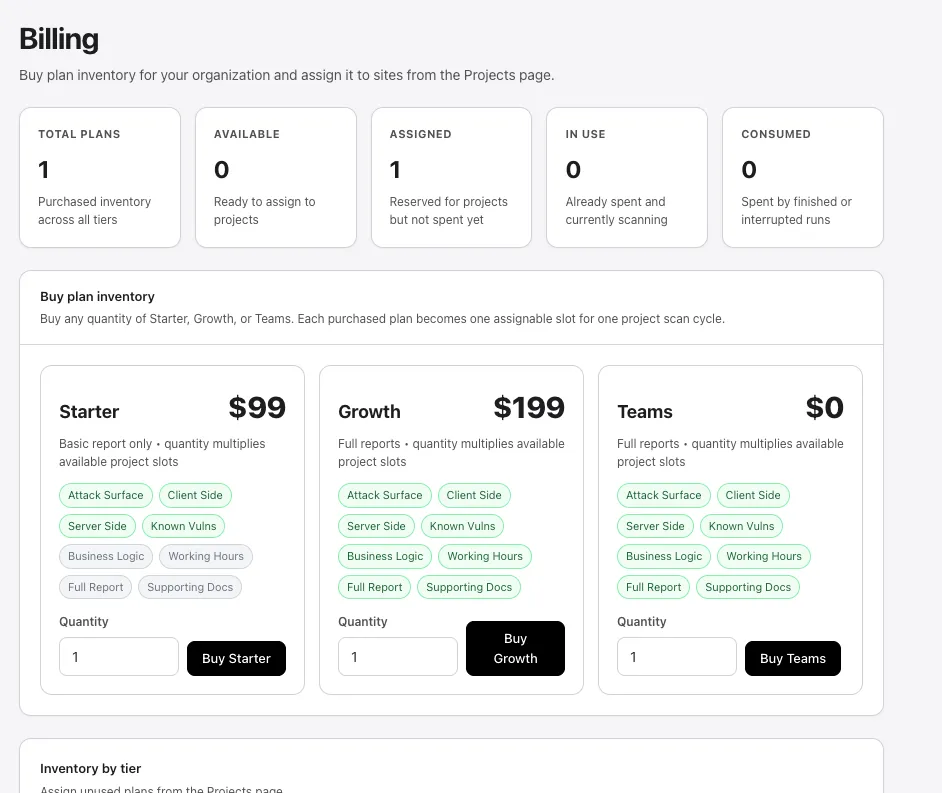
PhantomOps offers three plan tiers: Starter, Growth, and Teams. You buy plan inventory from Settings → Billing and assign one slot to each project before launching a full scan.
How plan slots work
Section titled “How plan slots work”Each purchased plan becomes one assignable slot for one project scan cycle. A slot moves through four states:
- available — purchased but not yet attached to a project.
- assigned — attached to a specific project, ready to scan.
- in use — currently scanning.
- consumed — spent. You cannot run another full scan on that project until you assign a fresh slot.
Quantity multiplies available project slots — buying five of any tier gives you five assignable slots. To run multiple scans on a project, buy more plans.
Plan tiers
Section titled “Plan tiers”Starter — $99 per slot
Section titled “Starter — $99 per slot”Best for: a one-off assessment of a small application, or evaluating PhantomOps before committing to a higher tier.
- Four of the five scan agents are included; Check login, roles, and permissions is locked.
- Basic report depth.
- Custom working-hours scheduling is unavailable (scans run anytime).
- Supporting-document uploads are locked at launch.
- AI assistant on findings is capped at 5 questions per finding.
Growth — $199 per slot
Section titled “Growth — $199 per slot”Best for: regular assessment cycles on production apps, especially those with logins and APIs.
- All five scan agents.
- Full reports with executive summary, methodology, and remediation plan.
- Custom working-hours scheduling.
- Supporting-document uploads (up to 10 files / 30 MB total per scan).
- Higher AI assistant caps.
- Business Logic agent unlocked.
Teams — usage-based
Section titled “Teams — usage-based”Best for: organizations running many scans across multiple projects, with multiple roles and audit requirements.
- Everything in Growth.
- Organization-admin access controls.
- SSO / SAML.
- Audit logs.
Feature matrix
Section titled “Feature matrix”| Feature | Starter | Growth | Teams |
|---|---|---|---|
| Map the site structure | ✅ | ✅ | ✅ |
| Check the browser experience | ✅ | ✅ | ✅ |
| Check the server and APIs | ✅ | ✅ | ✅ |
| Check known software flaws (SCA) | ✅ | ✅ | ✅ |
| Check login, roles, and permissions | locked | ✅ | ✅ |
| Business Logic agent | locked | ✅ | ✅ |
| Full report depth | basic only | ✅ | ✅ |
| Custom working hours | locked | ✅ | ✅ |
| Supporting documents at launch | locked | ✅ | ✅ |
| Organization-admin access | — | — | ✅ |
| SSO / SAML | — | — | ✅ |
| Audit logs | — | — | ✅ |
For per-agent explanations, see Scan types. For report variants, see Export and reports.
Buying plans
Section titled “Buying plans”Plan inventory is purchased from Settings → Billing. Set the quantity for the tier you want and select Buy {tier} to send the purchase to Stripe checkout.
For the checkout flow and invoice history, see Checkout and invoices.
See also
Section titled “See also”- Credits — included credits versus purchased credits, and how scans consume them.
- Manage projects → Reassign the plan — assign a slot to a project.
- Settings → Billing — the in-app billing surface and current inventory.